

Elden Ring: Apply Ashes of War and Choose an Affinity
On this page
You can change a weapon’s skill without taking the affinity printed on its Ash of War. Choose the Ash for the move you want, then choose an available affinity for the weapon’s damage and scaling. Applying another Ash replaces the current skill; it doesn’t add a second skill button.
Start with a weapon and Ash you already own
Have the Whetstone Knife or another Whetblade, a weapon and a compatible Ash of War in your inventory. A Whetblade gives you the Ashes of War menu while resting at a Site of Grace. If you’ve already reached Smithing Master Hewg, he can apply Ashes without the knife.
Check two separate restrictions:
- Can the weapon accept an Ash? Somber Smithing Stone weapons cannot. Some weapons that use regular Smithing Stones also have fixed skills, so the upgrade material alone doesn’t prove compatibility.
- Does this Ash fit that weapon type? Read the Ash’s description. A sword-only Ash will not appear as a choice for a hammer. Whetblades cannot remove that restriction.
Apply the Ash, then choose the affinity
- Rest at a Site of Grace and open Ashes of War.
- Select the weapon you want to change. If you carry several copies, check its name and reinforcement level before selecting it.
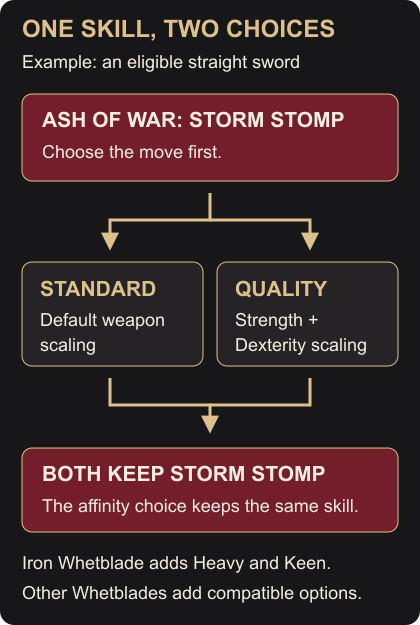
- Select a compatible Ash you own. Storm Stomp is a simple example for an eligible melee weapon.
- Choose an affinity from the next menu and confirm. For Storm Stomp, Standard keeps the weapon’s default scaling; Quality changes its Strength and Dexterity scaling. Both options are available without an extra affinity Whetblade.
- Open the weapon’s details in Equipment. Check the skill name, attack values, attribute scaling and passive effects. Equip that weapon in your right hand before trying the skill.
The affinity applies to the weapon while equipped; you don’t have to activate the skill to turn it on. Its reinforcement level stays in place. Spending Smithing Stones is a separate step covered in Weapon Upgrades.
Use the skill and check the result
These are default PS5 controls on foot. If you’ve changed your controls or play on another platform, use your binding for the named action.
With the weapon in your right hand, hold Triangle and press R1 to two-hand it. Release those buttons, then press L2 for its skill. Two-handing puts your shield away so its skill cannot take priority.
For Storm Stomp, press L2 once in clear space. Your character should stamp the ground and create a brief gust around their feet. A stomp without the gust can mean you lack enough FP or don’t meet the weapon’s attribute requirements. Refill FP at a Grace or with a Flask of Cerulean Tears, check the requirements and try again.
If L2 performs a parry or shield bash, the shield’s skill is active. Two-hand the right-hand weapon as above. To keep a shield in use while accessing the weapon skill, use a shield with No Skill, or apply the No Skill Ash to a compatible shield. Removing an applied Ash restores the shield’s default skill, which may still be Parry.
Other skills may need a held input or a follow-up attack. Read that skill’s description; repeatedly tapping L2 won’t complete every move.
Find out why an affinity is missing
An Ash normally offers Standard and its own native affinity. Whetblades add choices within compatible groups. In this table, physical Ash means an Ash whose native affinity is Standard, Heavy, Keen or Quality.
| Whetblade you hold | Extra affinities | Compatible Ash groups |
|---|---|---|
| Iron | Heavy, Keen, Quality | All groups, where the weapon permits those affinities |
| Glintstone | Magic, Cold | Physical, Magic or Cold |
| Red-Hot | Fire, Flame Art | Physical, Fire or Flame Art |
| Sanctified | Lightning, Sacred | Physical, Lightning or Sacred |
| Black | Poison, Blood, Occult | Physical, Poison, Blood or Occult |
For example, Storm Stomp has a physical native affinity, so Black Whetblade can give a compatible weapon Blood affinity while keeping Storm Stomp. A Cold-native Ash cannot take Blood affinity, even when you own Black. Keep the Cold skill with one of its permitted affinities, or choose a compatible physical or Blood-group Ash for the Blood weapon you want.
The weapon can impose another limit. Bows, for example, stay Standard even when an Ash can change their skill. Collecting every Whetblade doesn’t give every weapon every affinity.
Choose scaling that suits your character
Use the affinity preview to compare what changes on your actual weapon:
- Heavy, Keen, Quality: Strength, Dexterity, or a split between the two. Quality can lower attack power at your current attributes; its name doesn’t mean an automatic upgrade.
- Magic and Cold: both add Magic damage and Intelligence scaling; Cold also adds frost buildup.
- Fire and Flame Art: both add Fire damage. Fire favors Strength; Flame Art adds Faith scaling.
- Lightning and Sacred: Lightning favors Dexterity; Sacred adds Holy damage and Faith scaling.
- Poison, Blood and Occult: Poison and Blood add their named buildup. Occult adds Arcane scaling and can scale a weapon’s existing bleed or poison, but doesn’t give a weapon bleed simply because you selected it.
Check passive effects as well as the attack total. A higher total split across Physical and an element faces separate defenses, so it needn’t hit harder against the same enemy. The skill can also have its own damage rules: giving Storm Stomp a Blood weapon doesn’t make its gust apply that weapon’s bleed buildup.
Change your choice or recover the old skill
To keep the move but change its affinity, return to Ashes of War, select the same weapon and Ash, then choose another available affinity. Selecting Standard keeps that Ash’s skill with default weapon scaling.
To restore the weapon’s default skill instead, select its applied Ash and choose Undo enhancement in the affinity menu. The Ash returns for reuse. Changing or removing an Ash doesn’t consume it, and moving a single copy to another weapon removes it from the first.
If you want the same Ash on two weapons at once, take Lost Ashes of War to Hewg and use Ash of War duplication, then select an Ash you already own. This consumes the Lost Ashes material to make another copy. Duplication cannot extract a fixed unique skill.
If a grease or weapon-enchantment spell stopped working after the change, check the affinity. Elemental and status affinities normally block those outside buffs. Switch an otherwise buffable weapon back to Standard, Heavy, Keen or Quality if you want to apply one. Buffs supplied by skills have their own rules.