
Loot a Useful Kit and Recover Safely Between Fights
On this page
Pick up a weapon and matching ammunition first, then collect armour and healing as you search nearby rooms. Once you can defend yourself and recover from damage, turn your attention to the route ahead. Your inventory should support that next move rather than become a reason to stay in a dangerous building.
Give every item a job
Keep ammunition for the weapons you carry. Take an attachment when you can fit it to your kit or have a clear reason to save it. If you are constantly running out of space, remove unused ammunition and attachments before deciding you need a larger backpack.
| Equipment | What to check |
|---|---|
| Weapon and ammunition | Correct ammunition, loaded weapon and a usable fire mode |
| Helmet and vest | Equipped slots, level and remaining condition |
| Healing and boosts | Items available for recovery after the next fight |
| Utility and attachments | A practical use, instead of an unplanned collection |
Leave room for a throwable you know how to use. The official throwable overview lists options including Smoke Grenades; practise selecting the intended item so you do not discover the wrong throwable is equipped during a crossing.
Compare armour before swapping
Look at both the level and condition of your equipped helmet or vest and the replacement. A healthier piece of the same level is a simple comparison. A damaged higher-level piece versus a healthier lower-level piece needs more care; do not use one universal durability cutoff for every situation.
Make sure you actually equipped what you intended. Treat the backpack as an inventory item, and check the helmet and vest slots separately. After taking fire, check those slots again before assuming your equipment is ready for another fight. You can practise equipment changes alongside healing in Basic Training.
Allow time for recovery
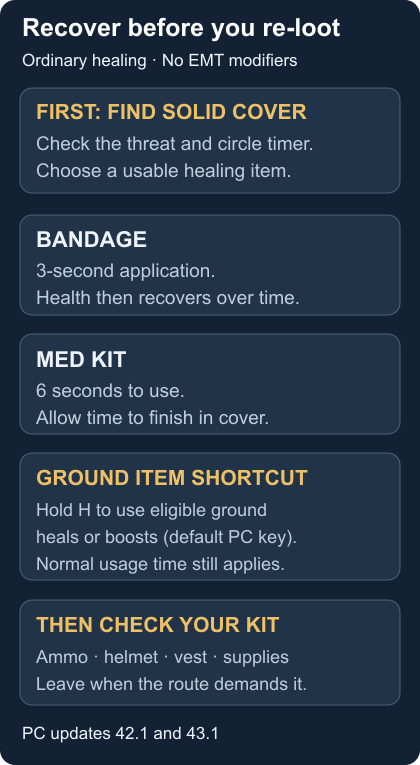
Find solid cover and check the circle timer before starting a heal. Choose an item suited to your missing health, then allow its action to complete. A successful heal is not a reason to step immediately back into the same exposed angle.
For ordinary use without EMT modifiers, a Med Kit takes 6 seconds, while a Bandage has a 3-second application followed by healing over time. The Boost Gauge also restores health in intervals. These distinctions come from Update 42.1; they do not make any healing item an instant escape from incoming fire.
Use ground healing without rearranging the whole pack
On the default PC controls introduced in Update 43.1, hold H to use an eligible healing or boost item on the ground without first putting it in your inventory. Its usual conditions and usage time still apply. The name “Instant Item Use” refers to direct access, not zero healing time.
A red interaction prompt means the item cannot be used in your current state. Ground Bandage stacks support consecutive use. Tapping H carries an eligible ground item instead, so check the prompt and distinguish carrying from using. Follow your current binding if you have changed the controls.
Recheck quickly after a fight
Once the immediate threat is dealt with, reload, recover and check your ammunition and equipment. Approach a death box with a short list of what you need, then leave when you have it. An additional attachment is rarely worth ignoring the next circle for.
Supply drops contain valuable gear, but their red smoke also advertises them to other players, as the official overview explains. Look for a safe approach and an exit before committing. Skip the drop if reaching it would leave you badly placed.
Fix the problem that is slowing you down
If healing will not begin, read the current item prompt and conditions. If your pack is full, discard items without a purpose in this kit. If you keep dying in menus, shorten the inventory stop and choose better cover first. If the circle forces you out before recovery finishes, plan an earlier departure next match.
Use the first-match checklist to practise this routine, then follow the rotation guide to turn a useful kit into a better position.