
Request the Clan Castle Reinforcements Your Attack Needs
On this page
Request the support your planned attack needs, then check that it actually arrived. On Clash of Clans mobile, your Home Village Clan Castle request can specify units and limit their levels, but an unfinished request is still an unfinished army.
Choose the missing part of your army
Begin with the army you intend to use. If you are still choosing it, the Cookbook setup guide helps you inspect the main composition first. Then name the reinforcement your opening or later push depends on.
Tap Request in your Clan Castle menu. Choose the troops, spells or siege machines your plan needs; unspecified choices are left to donors. Request entry points
Read the selected request before posting it. A short, precise request is easier for a clanmate to fill than a vague request for the strongest troops. If one particular unit matters to your plan, make that clear instead of hoping a donor guesses your intention.
Check the level filter and unused space
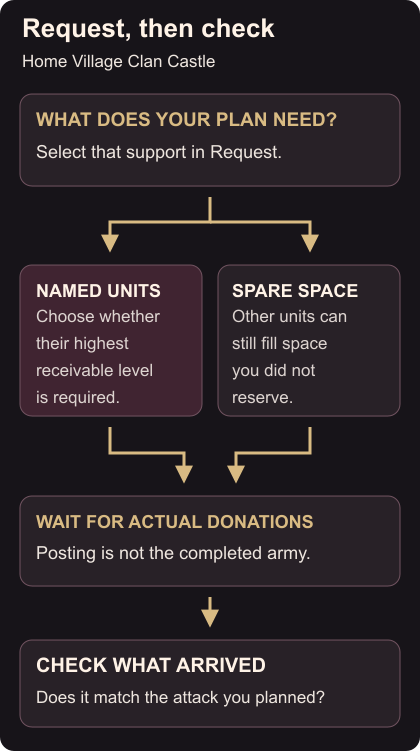
The option “Only allow highest level donations you can receive” restricts selected units to your Clan Castle’s allowed maximum. It is unavailable without specific selections. Any housing space left unreserved can still receive other units at any level. Donation restrictions
Decide whether the selected unit needs that restriction for the attack you’re preparing. If you can use a lower-level version, leaving the option off gives clanmates more ways to fill that selection. Keep the decision tied to the army you understand.
Review the unused space as well as the named units. If you leave room for extra donations, expect that part of the result to vary. This is especially easy to miss when you’ve concentrated on one requested unit and stopped reading the rest of the request.
Verify the contents before attacking
Once donations arrive, inspect the Clan Castle contents against your request. Identify the support you plan to deploy and the moment you expect to use it. Posting the request is a preparation step; seeing the required unit in the Castle is the check that matters before committing.
If the contents surprise you, review what you selected, what space you left open and whether you enabled the level restriction. If the request remains unfilled, ask your clan whether someone can supply it. You can then adjust the planned army or accept an appropriate alternative before entering battle.
Recheck before the next attack
Donated troops used in an attack do not return, even if they survive. Your War Base’s defensive Clan Castle is separate from the Castle supplying your own attacks. Attacking and defensive reinforcements
Before another real attack, inspect your reinforcements again and request what is missing. Use a Friendly Challenge to work on selection and deployment decisions. Keep that practice goal clear, then return to the real army screen to check the support for your next battle.