
Prepare a Cookbook Army and Arrange Its Deployment Order
On this page
A Cookbook suggestion gives you an army to start learning. Before attacking, inspect its contents and put the units where you can find them quickly. This guide covers the Home Village on Clash of Clans mobile, once the Cookbook is available in your Army Training screen.
Choose a Starter Army you can understand
Open Army Training and go to its third tab, the Cookbook. Starter Armies use regular troops, spells and common Equipment suited to your Town Hall. Featured and Creator armies are time-limited suggestions with a wider range of possible units. Cookbook choices
Start by reading one Starter composition before loading it into your army. Identify the first troop you expect to deploy and a spell you expect to use with the attack. If either is unfamiliar, read its information before trying to use it under pressure.
A recognizable name isn’t enough to explain an army. Look at the actual combination in front of you. Choose a suggestion with an opening you can describe, then keep it for a few practice attempts instead of replacing it whenever something goes wrong.
Inspect the selected army
After loading the suggestion, check the troop and spell selections, then the Heroes and Equipment you intend to use. If a warning appears, try selecting it for more detail; some Army Training notices provide an explanation when tapped. Army Training notices
Resolve the part of the setup you don’t understand before beginning. If something essential to your planned opening is unavailable, choose an opening you can actually perform. Avoid spending the first moments of a battle discovering that your intended support isn’t there.
Check Clan Castle reinforcements separately when preparing for a real attack. Knowing the main army doesn’t tell you whether the requested support has arrived.
Put the deployment bar in a familiar order
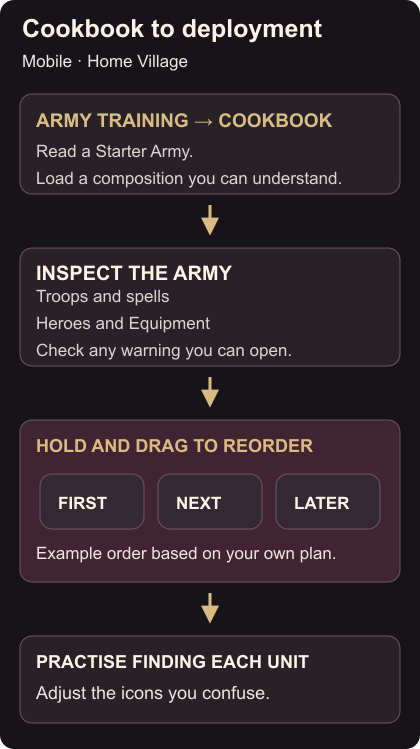
Hold and drag troops or spells in the training lineup to rearrange them. They appear in that order during battle. Heroes can also be reordered by holding and dragging. Lineup controls
Place your opening selection somewhere predictable and keep later support easy to recognize. Use the order to help you find units; it doesn’t choose their deployment timing for you. A spell placed beside a troop still needs your attention at the right moment.
Before entering practice, point to the first unit you plan to select, then the next support action. If you’re already hunting through the lineup, move the confusing icons now. Change a small part of the order so you can remember what moved.
Rehearse the selections
Use a Home Village Friendly Challenge with that army. Watch whether you select the intended troop and return your eyes to the battle quickly. If you choose the wrong icon, note which pair you confused.
For the next attempt, adjust that pair or change the deployment plan. Keep the remaining lineup familiar. Once the opening selections feel clear, practise finding the support you need later in the attack.