
Set Up a Home Village Friendly Challenge for Useful Practice
On this page
A Home Village Friendly Challenge lets clanmates practise an attack or test a defense without losing Trophies or resources. On Clash of Clans mobile, agree on one question before posting the invitation: an opening that went wrong, a late spell, or a unit you struggled to select. Friendly Challenges
Let the defender post the intended setup
The defending player opens Clan Chat and taps Challenge. Choose the layout, defending Clan Castle troops, message and Battle Modifier settings, then tap Start! to post the invitation. Defender setup
For an ordinary practice attempt, leave extra Battle Modifiers off. They alter combat stats, so agree on the same settings before comparing attempts. Use the message to name the part of the attack you want to watch.
Keep the layout steady while working on that question. If you move several defenses between attempts, the attacker has a different problem to solve. Save layout experiments for a session where the defense itself is the question.
Prepare the army before pressing Attack
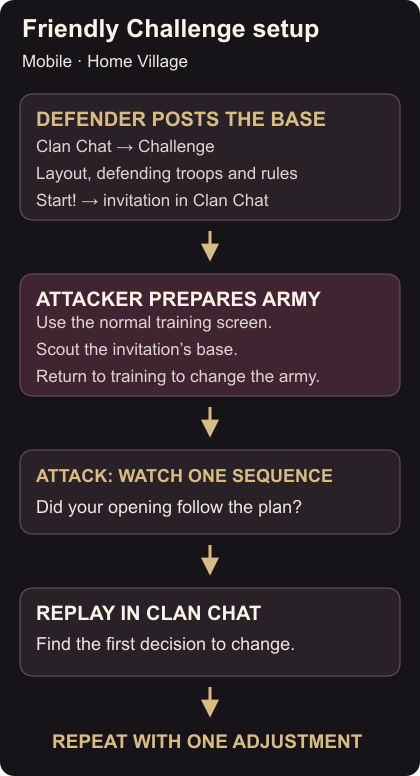
The attacker uses the army selected on the normal training screen when Attack is pressed. You cannot edit it from Scout. Set up the intended composition first, then find the invitation in Clan Chat and scout the base. Attacking army selection
If you need a starting composition, use the Cookbook army setup guide. Inspect the selected troops and spells, and make sure the first few units are easy to find on the deployment bar.
Scouting gives you time to choose an entry for the actual layout. Describe the first action before beginning. If that plan needs a different army, return to normal army setup and change it there before starting the attack.
Watch the first point where the plan changes
During the attack, concentrate on the sequence you agreed to practise. Select the intended unit, then return your attention to the base. Notice whether the next decision happens when you expected or whether you spend time searching for a spell or troop.
Clanmates can use Watch Live in Clan Chat, and the replay is available there afterward. Watching and replaying Ask your partner to look at the same moment so you can discuss a particular action instead of only the final stars.
Find the earliest visible point where the attack diverged from your intention. It might be the initial selection or the moment you delayed support. Choose something you can change on the next attempt, rather than replacing the whole army after one result.
Repeat with one adjustment
Keep the layout, army and modifier settings the same while you try a different timing or placement. Afterward, check whether that specific decision improved. Once it makes sense, move to another part of the attack or ask for a different layout.
When preparing to take the army into a real attack, check your Clan Castle reinforcement request separately. Finish the practice session by naming the opening and support action you plan to repeat next time.