
Warframe Mods, capacity and Endo: make your first upgrades fit
On this page
When a Mod will not equip, check three things: whether it fits that equipment type, whether an appropriate slot is available, and whether its Drain fits your remaining Capacity. Thinking through those checks is more useful than filling every empty box. Start with an upgrade you understand, then decide what you can afford around it.
Read the Upgrade screen
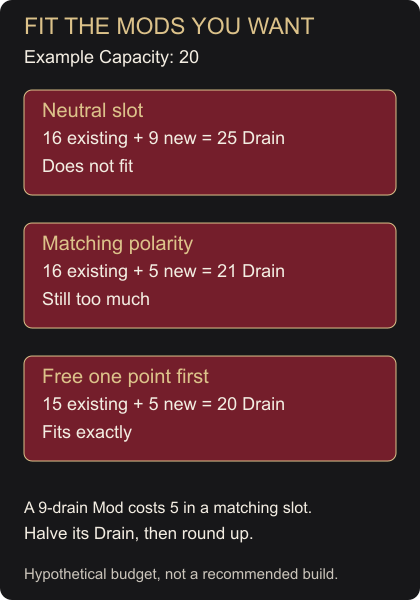
Open Arsenal > Upgrade. Ordinary Mods occupy slots and spend Capacity through their Drain value; the combined cost cannot exceed the item’s limit. Matching a Mod’s polarity to its slot halves the cost, rounding fractions up. A 9-drain Mod therefore costs 5 in a matching slot. A neutral slot uses the printed cost, while a mismatched polarity adds 25 percent. Official Mods Guide
Here is a hypothetical budget, not a suggested build:
| Capacity 20, existing Drain 16 | New total | Fits? |
|---|---|---|
| Add a neutral 9-drain Mod | 25 | No |
| Put that Mod in a matching slot: cost 5 | 21 | No |
| Free one point elsewhere, then add it | 20 | Yes |
The arithmetic illustrates why a matching symbol does not guarantee room. Check the resulting total rather than judging by the number of empty slots. Official Mods Guide
Upgrade with Endo and Credits
Fusion increases a Mod’s rank, improving its effect while increasing Drain. It requires both Endo and Credits. At the Mods interface, select the intended Mod, choose Fusion, select an affordable rank, then review the cost before applying and confirming it. Check its eligible equipment type as well; a useful-looking effect does not mean the Mod works on every item. Support’s Mod Guide
Raise a Mod a little, inspect the resulting Drain, and return to the equipment’s budget before spending more. Give yourself a reason for each upgrade. If the change would force out another useful Mod, compare the tradeoff first instead of treating the highest affordable rank as an automatic target.
Turn unwanted duplicates into Endo
One Mod copy can serve multiple compatible items, so you do not need a separate copy for every weapon. Official Mods Guide Digital Extremes recommends converting unwanted duplicate Mods into Endo early. Beginner tips
Use the search, categories and sorting controls to find the correct copies before selling or dissolving anything. Credits and Endo are different conversion choices. Transmutation instead uses four Mods to produce a random result, without guaranteeing a rare Mod; leave that experiment until your basic upgrades are funded. Support’s Mod Guide
Understand the bigger upgrades
Catalysts double weapon Capacity; Reactors double Warframe Capacity. Aura and Stance Mods add Capacity. Forma changes slot polarity rather than simply doubling the budget. Official Mods Guide It also resets equipment rank to Unranked. Quick Start Guide Applied Forma cannot be removed, so inspect the selected item and polarity carefully. Forma FAQ
That equipment reset does not erase account Mastery. Re-earning already credited ranks after polarization, or on an identical replacement item, does not award those Mastery points again. Mastery Basics
For an in-game demonstration, complete The Teacher after Vor’s Prize; it covers polarity, Endo and Fusion. Update 40 Before the next mission, confirm your Mods fit, the chosen effects suit what you need, and any duplicates selected for conversion really are expendable. Leave a slot empty when the alternatives do not improve your plan.