
Choose Skill Gems and Fix Supports That Do Nothing
On this page
Start with one skill you enjoy pressing, then make its supports serve that skill. Before spending an Uncut Skill Gem, check the weapon you plan to use and read the skill’s requirements. A good choice for your next fight is one you can equip, understand and use comfortably.
Turn an uncut gem into a usable skill
Using an Uncut Skill Gem opens the selection for available skills. Its level limits the choices, so an early gem does not unlock every ability. You can also use a suitable uncut gem to upgrade an existing skill.
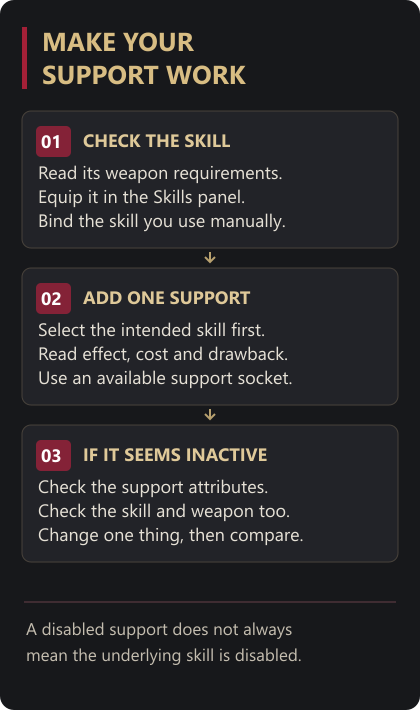
Read the weapon requirement, character requirements and cost on the skill details. Choose a skill that works with your equipment, place it in the Skills panel and assign your manually used skill to a control you can reach.
Try it before adding several supports. Notice how long you commit to the action, how close you need to stand and how quickly repeated uses spend your resources. Those observations give you a reason to change it.
Choose a support for the intended skill
In the Support Gem cutting interface, select the skill you want to modify and inspect the available choices. Use the compatibility information rather than picking a gem by its name alone. The interface includes an All Valid tab. GGG skill interface changes
Read the whole effect, including any drawback or restriction. A support can change how a skill behaves instead of simply increasing damage. Check its requirements and the resulting skill cost, then put it in an available support socket. Jeweller’s Orbs can add support sockets to eligible Skill Gems; read the orb’s own requirements before using one.
Test one support at a time in an encounter you recognise. If the skill becomes awkward to sustain or loses a behaviour you relied on, remove that support and compare again. A larger damage number is less useful when you cannot use the skill at the moments you need it.
Check tiers and disabled supports
Many supports have different tiers, and a higher tier may change the effect as well as its values. Read it again before replacing the version you know. You can use copies of a support across different skills; there is no character-wide one-copy restriction. GGG support system changes
If a support seems inactive, check its attribute requirements. Falling short disables that support rather than automatically disabling the underlying skill. If the skill itself is unavailable, check its own requirements and the equipped weapon as a separate problem.
For example, a gear swap may remove an attribute that a support needs. Put the previous item back temporarily and inspect the support again. Use the equipment comparison guide to decide whether the new item is worth that trade.
Once the setup works, practise a short attack and an escape with it. The dodge and flask guide helps you fit the skill into a fight without holding it through every enemy windup.