
Place Your First Palbox and Give Pals Work
On this page
Your first Palbox establishes the area your base Pals use. Place it where workers can reach their jobs, then assign a captured Pal and watch one useful task finish.
Choose the ground before placing the Palbox
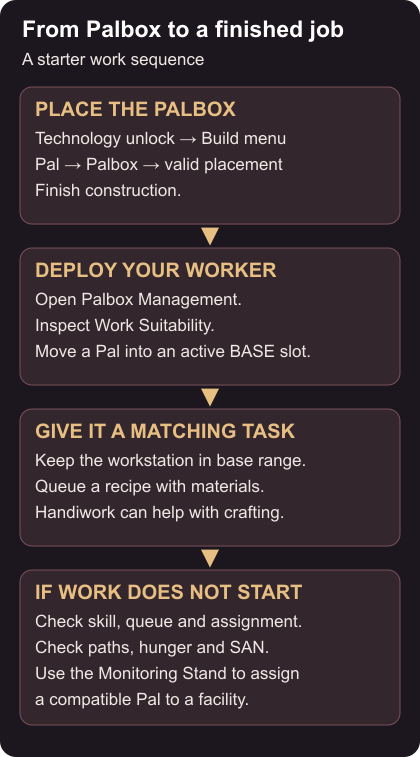
After your opening capture, unlock Palbox in Technology. The unlock needs level 2 and one Technology Point; construction needs one Paldium Fragment, eight Wood and three Stone. Its surrounding area becomes your base (Palbox). The move is simple: walk the ground first, then open the build menu, choose Pal, select Palbox, and confirm when the preview shows a valid placement (Putting Pals to Work). If the preview is invalid, move or rotate until the error clears rather than forcing a spot you have not checked.
Flat, clear land near starter resources is easier to build on. Leave room for the Palbox, workstations, storage, feed, beds, and paths between them. The boundary appears blue, and work facilities should sit inside it (Building). Finish construction using the work prompt shown on screen, then leave the area around the Palbox clear, since workers spawn there.
Deploy a worker from Palbox Management
Interact with the completed Palbox and open Palbox Management. Inspect a captured Pal’s Work Suitability, then move it into an active base slot (Palbox). Party and storage are separate from base slots, and base level controls how many worker slots you have. After assigning a Pal, close the screen and watch for the worker to appear.
A Pal’s suitability decides what jobs it can take: Handiwork for crafting and building, Kindling for cooking and furnaces, Planting for crops, Watering for irrigation, Gathering for harvests, and Transporting for carrying items to storage (Work Suitability). Compare the required job against the Pal before expecting it to work.
Match a Pal to a queued job
Place a bench and a chest inside the boundary, open the bench, and queue a recipe you have materials for. A suitable worker should complete the craft; collect the product. Keep the first queue small so you can see whether work starts before adding more facilities.
If the Pal does something else, the Monitoring Stand, unlocked at tier seven for two points, offers a basic assignment path: build it, open Fixed assignment management, choose the workstation, choose a compatible Pal, and confirm (Monitoring Stand). Fixed assignments can leave a Pal waiting at an empty facility; clear or change that assignment when the job is done. The stand also controls allowed work types and intensity; it cannot add a missing suitability.
When a worker idles, check the recipe queue, materials, suitability and assignment. Then look at its path, hunger and SAN. Facilities warn when no base Pal meets the required suitability (release note). Suitability explanations also appear in Pal status and Palpedia (current note).
Keep storage near workstations with clear paths, and add one station only after the basic job works. Do not raise intensity to fix a wrong assignment. For the next steps, see first capture and survival and food, sanity, and base care.