

Hollow Knight: Silksong Tools Guide: Equip, Use and Refill
On this page
Equip a Tool at a bench
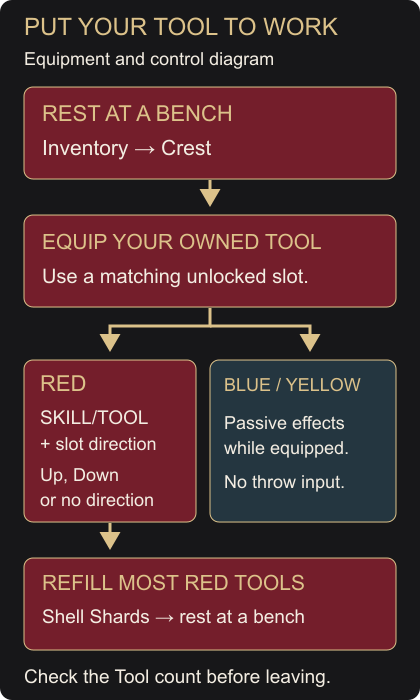
Buying a Tool does not make its effect active. You need to equip it on your Crest while resting at a bench. Bring an owned Tool and, for a Red Tool that needs refilling, some Shell Shards.
- Sit at a usable bench, then open Inventory.
- Move to the Crest tab and check the Crest you have equipped.
- Highlight the Tool you want to use and press the displayed Equip Tool button.
- Check that it occupies an unlocked slot of the matching colour. If every matching slot is occupied, replace an equipped Tool before leaving the bench.
An empty slot of a different colour will not solve a full loadout. Crests have different numbers of Red, Blue, Yellow and Silk Skill slots; some slots start locked. Changing Crest can also change Hornet’s Needle attacks, so check the new setup before returning to a boss.
Use the input for the equipped slot
| Tool colour | How it works |
|---|---|
| Red | Usually a limited-use active Tool. Press SKILL/TOOL with the direction assigned to its slot: Up, Down, or no direction. |
| Blue | A passive combat or survival effect while equipped. No Shell Shard cost. |
| Yellow | A passive exploration or gathering effect while equipped. No Shell Shard cost. |
If you already have Straight Pin, equip it and try one throw in a clear room. Face the open space, hold the direction assigned to its slot, then press SKILL/TOOL. If that slot uses no direction, press SKILL/TOOL alone. Hornet should throw a pin forward and use one charge. Getting a Silk Skill instead is a reason to recheck the slot and directional input.
Blue and Yellow Tools do not need that throw input. For example, an equipped Shard Pendant increases Shell Shards dropped by defeated enemies. It does not increase the yield from deposits or Shard Bundles.
Refill before the next attempt
Most Red Tools replenish when you rest at a bench, spending Shell Shards. The cost varies by Tool. After using some charges, return to a bench and check the Tool’s amount before heading out again.
If it is still empty, check these points:
- Rest at the bench. Standing beside it does not replenish Tools.
- Check your Shell Shards. If you are short, defeat enemies or break shard deposits, collect the drops, then rest again. You can also break a Shard Bundle you already own.
- Check the Tool’s resource. Rosary Cannon loads with Rosaries. Some specialised Tools use other resources, and Tools that require Silk still need it when fired.
Architect Crest’s Craft Bind lets you replenish Tools away from a bench, but it still spends the Shell Shards those Tools normally require. You do not need that Crest for the bench refill above.
Unlock slots or increase your supply
These upgrades solve different problems:
| What you need | Upgrade to use |
|---|---|
| Another equipped Tool | A Memory Locket unlocks a locked Tool slot on a chosen Crest. |
| More Red Tool uses between rests | A Tool Pouch increases capacity for most Red Tools and lets you carry more Shell Shards. |
| More Tool damage | A Crafting Kit strengthens damage-dealing Tools. It does not add an equipment slot. |
With a Memory Locket in your inventory, open the Crest tab, choose the locked slot you want and use its unlock prompt. That choice expands this Crest’s slot, rather than every Crest. Unlocking can be done away from a bench; equipping your extra Tool still requires a rest.
Keep Rosaries available for travel
Rosaries pay for purchases and applicable bench or travel tolls. Keep stored Rosary Strings and Necklaces intact until you need the money: strung Rosaries survive death, but must be broken loose before you can spend them.
Before buying another Tool, set aside the cost of your next map or checkpoint. Maps, Benches and Bellways covers mapping purchases; Bellway Locations puts each station’s price beside its map. If your current Tool keeps running dry, refill it and check your pouch capacity before spending your travel money on another weapon.