
Choose Heal, Mend or Recovery for the Right Health State
On this page
Choose the interaction that matches your condition before looking for a place to use it. In Dead by Daylight’s standard 1v4 survivor matches on PC and console, healing an injury, Mending Deep Wound and recovering on the ground solve different problems.
Heal the teammate in front of you
Survivors can heal one another without a Med-Kit. Healing someone from the Dying State gets them back to injured; another heal is needed to make them healthy. Health states
Approach an injured teammate, get within interaction range and use Heal when the situation allows. If both of you can move, choose nearby cover first. Leading them on a long search for a perfect hiding place can waste the opening you already have.
If you are receiving the heal, stop moving and give your teammate a chance to finish. Check the surroundings without repeatedly walking out of range. If the Killer approaches, move rather than assuming the last portion of the heal will finish before an attack.
After helping someone stand up, reassess. They are injured, but continuing into another heal beside an approaching Killer may leave both of you exposed. Give the rescued player room to move and look for another opportunity once the immediate pressure passes.
Check whether self-healing is available
An ordinary self-heal requires a Med-Kit or an effect that enables it. Med-Kit charges are limited, so check the item before committing to healing alone. Med-Kits If you lack that option, seek a teammate instead of repeatedly trying to activate it.
Broken prevents healing beyond the Injured State. Broken If it is active, a teammate cannot simply heal it away. Choose your position and next task with that limit in mind; different causes of Broken need different conditions to end.
Mend before the wound becomes a down
Deep Wound uses Mend. You can Mend yourself without a Med-Kit, and completing it removes Deep Wound while leaving you injured. Its timer pauses while you run or Mend. Deep Wound and Mending
Reach nearby shelter as the chase allows, then start Mend and watch it finish. Don’t settle into a generator repair while the wound timer is draining. Once Mending is complete, check whether a normal heal is available and whether there is time to do it.
Treat the two actions separately. Finishing Mend solves the wound timer, but it does not mean your survivor is healthy again. Look at the resulting condition before you return to work or ask a teammate to help.
Recover while you wait for help
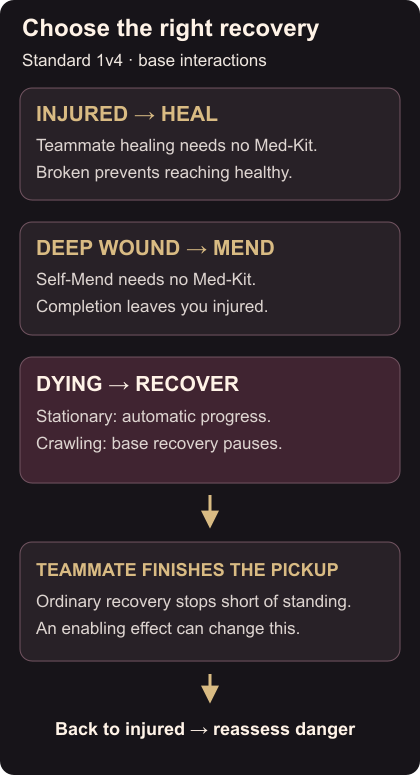
Recovery in the Dying State is automatic; you do not need to hold a recovery button. Automatic recovery Base recovery progresses while stationary and pauses while crawling. It stops short of picking you up unless an effect enables full self-recovery. You also cannot use a Med-Kit while dying. Dying State
Decide whether a short crawl would reach useful cover or an approaching teammate, then stop to recover. Constantly crawling delays the progress your teammate could finish. When help arrives, allow the pickup and prepare to move if the Killer is nearby.
Use the movement and window guide to choose your next cover. When you can safely contribute again, return to the objective with the generator skill-check guide.