
Use Production Limits and Keep Scarce Ingredients
On this page
If a resource keeps disappearing, inspect its consumers before adding another production building. In Against the Storm on PC, recipe permissions and production limits give you two useful controls: what a building may consume and how much finished stock it should produce. This guide covers ordinary base-game settlements on Settler through Viceroy, without special map modifiers.
Find what is spending the resource
Pause and open Recipes, using its toolbar button or the default U key. Switch to Ingredient mode and select the scarce resource. Expand the entries to see which recipes use it. With Show All off, the panel focuses on what is available; turning it on also exposes unavailable options. Recipes panel
Start with buildings that actually exist in your settlement. A recipe you could unlock later cannot be consuming anything now. Open each current producer and consider whether its output has a purpose this season. Disable an unwanted recipe before spending materials to feed it.
Keep the first investigation small. If wood is running low, follow wood’s consumers first instead of changing every recipe in the settlement. That gives you a change you can observe when you unpause.
Choose which inputs are allowed
Inspect a recipe’s ingredient slots. Round icons with rotating arrows indicate alternatives; square icons represent fixed ingredients. You can change which alternatives are allowed. Ingredient controls
Before disabling a scarce input, check whether an allowed replacement is available. Otherwise, stopping that consumption may also stop the output you need. A fixed ingredient cannot be replaced just because another resource looks similar.
Read the displayed quantities for the recipe you intend to use. Compare the cost against your stock and the next job’s requirements. A star rating helps identify recipe quality, but the actual inputs are what let you judge whether this particular settlement can support it.
Set a limit and check each producer
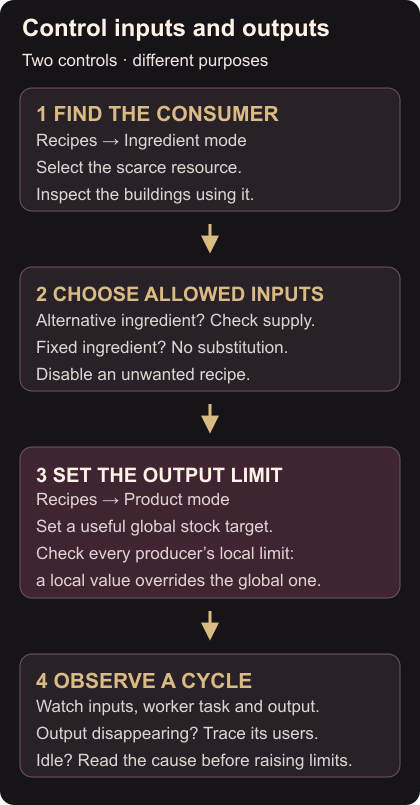
Switch to Product mode and choose the finished good. The panel shows stored stock and the global production limit. A limit set inside an individual building overrides that global value. Production limits
Choose a modest stock target connected to a real need. For building materials, count the construction you plan to start next. For an ingredient, consider the downstream recipe you want to keep working. There is no single useful target for every settlement.
Then open each producer of that good and check its local limit. An unexpected override can explain why changing the global setting did not have the effect you expected. Recipe toggles and limits are separate controls, so inspect both. Developer recipe controls
Watch the result before changing more
Unpause and follow one production cycle. Look for the input leaving stock, the worker’s current task and the resulting output. If the building is idle, inspect its status before raising the cap: missing ingredients, absent workers and a reached limit call for different responses.
If the output immediately disappears, return to Ingredient mode and select that output to trace the next consumer. A cap on one finished product does not explain every competing use of its ingredients.
Use the Small Farm season guide when grain or vegetables are part of the supply you are planning. For fuel you need to keep through bad weather, the storm hostility guide covers the next decision at the hearth.