
Merge Two 60-Item Belts Without Creating a Bottleneck
On this page
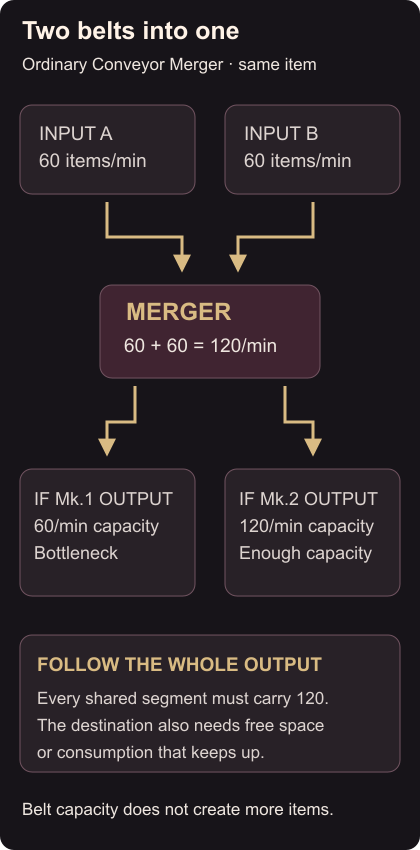
Two belts carrying 60 Iron Ingots per minute need an output that can carry 120 per minute. For unmodded Satisfactory on PC, use an ordinary Conveyor Merger and unlock Mk.2 belts before building this connection.
Connect the two inputs
Place the Merger with its single output facing your destination. Connect each existing ingot line to an input, then run a Mk.2 output belt to storage with room or a consumer that can keep up. The ordinary Merger combines its inputs in sequence; attaching a faster input belt does not give that line priority.
Mk.1 carries at most 60 items per minute. Mk.2 carries 120 and unlocks through Tier 2’s Logistics Mk.2 milestone. Here the two input rates add to 120, so Mk.2 has enough output capacity. Every shared segment after the Merger needs that capacity, including short connecting pieces. Conveyor capacities
Use the same item on both inputs for this connection. Mixed items can block machines that do not accept everything on the belt. Production line storage
Find the segment that stops the queue
With both supplies running and room at the destination, inspect the output route from the destination back to the Merger. Look for a remaining Mk.1 section, an incorrectly connected port or a full receiving container. Then check that both upstream lines really produce 60 each.
A faster belt cannot fix a consumer that only uses 60 per minute. An empty container can confirm the connection accepts both streams, but eventually fills unless you remove or consume its contents.
When expanding, add the rates again: a third 60-item input would make 180, exceeding Mk.2. Organize machine feeds with a three-Smelter manifold, or use storage overflow when a full container keeps stopping production.