
Choose Punisher's Rifle, Shotgun or Turret Before You Commit
On this page
Choose Punisher’s weapon around the shot you can actually take. In Marvel Rivals’ standard 6v6 matches on PC, learning when to stay mobile with a rifle or shotgun makes it easier to choose a useful Culling Turret position.
Learn the weapon switch first
Adjudication is Punisher’s automatic rifle; Deliverance is his shotgun. Both fire with left-click by default. The shotgun spreads its pellets more widely and loses damage over distance sooner than the rifle. Punisher’s weapons
Use your weapon-switch binding and confirm which gun is selected before firing. If you’ve changed controls, follow the ability name rather than the default key. Start in the Practice Range and make a simple comparison: aim at the same visible target with each weapon, then move farther away and repeat.
Pay attention to the spread and how comfortably you can keep your aim on the target. Avoid changing weapons after every missed shot. First decide whether the distance was unsuitable or your aim slipped away as the target moved.
In a match, start with the rifle for a view down a lane. Consider the shotgun when an opponent closes and you can keep its spread on them. If a close fight would leave you exposed to several enemies, move toward cover instead of forcing the duel. Team-Up selection can alter the guns’ damage, so build the habit around distance and aim rather than expecting every target to fall to the same number of shots. Weapon and Team-Up effects
Check the sides before pressing E
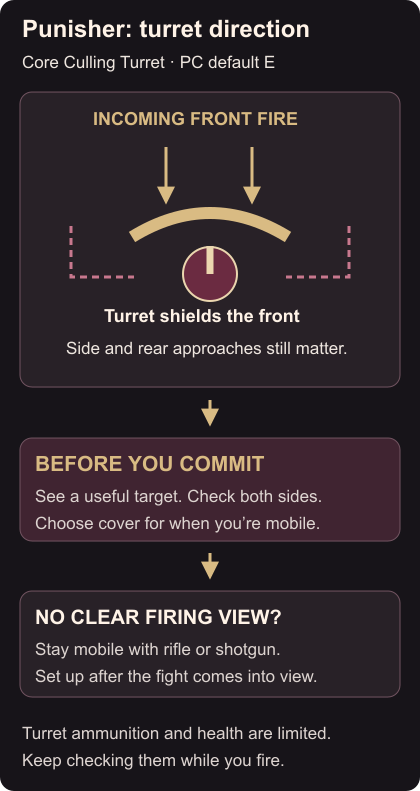
Culling Turret, on E, holds Punisher in place and protects him from damage at the front. Its ammunition and health are limited. Culling Turret
Before deploying, look at where the enemy is firing from and which side openings lead toward you. Pick nearby cover you can use once you’re mobile again. A position with a clear forward view can still be poor if an opponent can reach your back unnoticed.
Keep using your mobile weapons while the fight is disappearing around a corner. Setting up a turret before you can see a useful target leaves you stationary with little to shoot. During turret fire, keep checking the sides and your ammunition instead of watching only the opponent under your crosshair.
Plan where the grenade sends you
Scourge Grenade uses right-click to throw smoke forward and jump Punisher backward. The smoke obstructs enemy vision. Scourge Grenade Before using it against someone approaching, check the space behind you. Choose a retreat toward cover rather than an edge or another open firing lane.
Vantage Connection uses Shift to create a cable with a hook; F lets Punisher travel along it. Vantage Connection Practise the launch and travel before relying on them under pressure. Look at the arrival point as carefully as the place you’re leaving.
After a poor turret fight, identify whether the problem was an obstructed view, an unchecked side route or a late setup. Use that answer to choose your next position. For support around that position, read the Mantis Life Orb guide and the Magneto shield guide.