
Start Dota 2 With One Hero and a Clear Practice Plan
On this page
Your first Dota 2 sessions are easier to follow when you learn one hero while practising the controls. All heroes are free, and Valve recommends hero demo and bot matches as places to start. Dota 2 on Steam
Understand the Objective and Controls
Your team wins by destroying the enemy Ancient before yours is destroyed. Right-click the ground to move and an enemy to attack. Landing the killing blow on an enemy creep earns last-hit gold; nearby allied heroes share experience when enemies die. Your fountain restores health and mana and is where you respawn. These basics are explained in Valve’s tutorial text, hosted by SteamTracking.
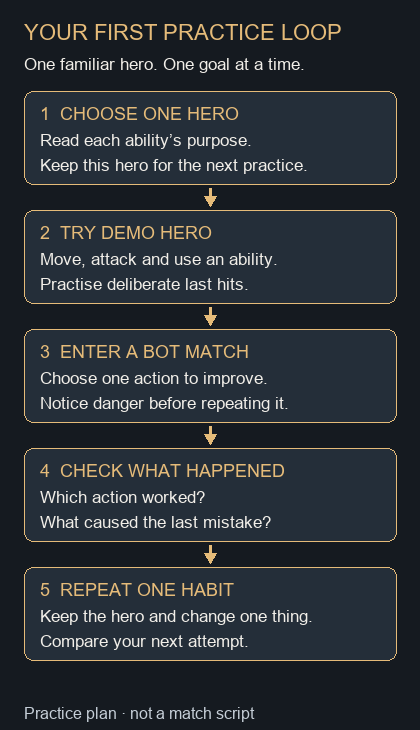
You do not need to understand every hero before playing. Choose one whose abilities interest you, then learn what each ability does and which target it needs. Keep that hero for the next session so you can spend more attention on the lane.
Practice in Hero Demo
Open the hero’s page and choose Demo Hero. Valve describes this mode as a place to try abilities and practise last hitting. Demo Hero overview
Work through these actions before entering a match:
- Move to a chosen spot, then select an enemy target to attack.
- Read an ability’s tooltip. Identify its purpose, target and mana cost before using it.
- Watch when the ability becomes available again, then repeat the action.
- Try to finish a low-health creep with a deliberate attack.
If you lose track of your hero while reading, pause the exercise and find it again before adding another action. Being able to move and select targets reliably will make the rest easier to follow.
Take One Goal Into a Bot Match
Choose a small goal you can recognise during play: land several deliberate last hits, use an ability for its intended purpose, or receive an item delivery without losing track of your hero.
Start in a lane and watch both the creeps and nearby enemies. If a tower starts attacking you, retreat before taking excessive damage. When you are too low to participate safely, check your healing options and make a recovery plan. Returning to the fountain is a fallback when you need a full reset. Valve’s movement and survival tutorial
For shopping, open a hero guide and read the purpose of one suggested purchase. If a term is unfamiliar, use the game’s glossary; Valve’s learning tools cover heroes, items, towers, creeps and status effects. Valve’s learning tools
After the match, identify one mistake you understood and one action to repeat. The result screen tells you who won; your notes should tell you what to practise next.
Continue with last hits and denies or items, the courier and Town Portal Scrolls.