
Make an Item by Activating an Alchemy Core
On this page
Activate an Alchemy Core to make an item through Atelier Yumia’s altar synthesis. Filling every surrounding slot is optional, so you can finish a basic item before you have ingredients for the whole arrangement. The controls below are for PS5.
Choose a learned recipe
Use the altar inside the atelier or a Simple Altar in a building area. Select the recipe you want to make. If you have not learned it, interact with a Recipe Recall Station and meet that recipe’s requirements first. Learning recipes
On the synthesis recipe list, a gray icon means you have not created that item yet. It does not mean that this listed recipe is unavailable. Check its core ingredient requirements: red ingredient names indicate something you do not have. Recipe and ingredient indicators
Activate a core, then choose your additions
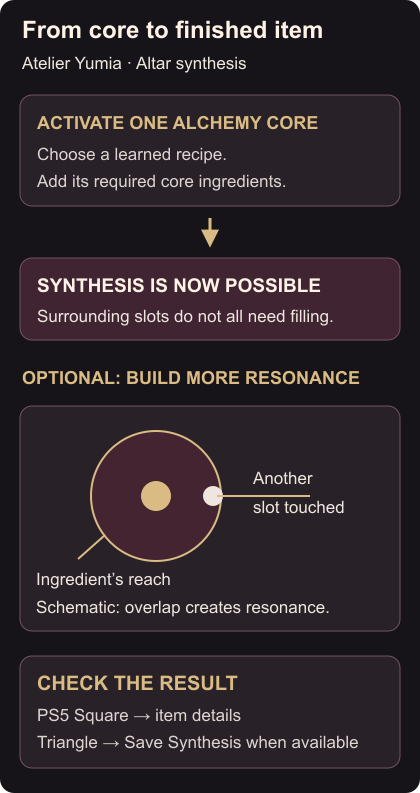
Select a core and add its required ingredients. One activated core is enough to make synthesis possible. Only Effect Alchemy Cores are available at first; other core types need Skill Tree unlocks.
For a stronger result, select an available Alchemy Slot and compare ingredients’ resonance areas and effects. An ingredient’s resonance area can touch cores, other slots and drifting mana. That contact creates resonance, and drifting mana within range is collected when you add the ingredient. Choose a useful overlap instead of filling a slot without checking its reach. Cores, slots and resonance
Finish the synthesis
Check the item details before finishing. On PS5, X selects recipes and ingredients; Square checks the item being synthesized. When synthesis is possible, use the Triangle / Save Synthesis prompt. Follow the confirmation and inspect the resulting item. PS5 synthesis controls
To add ingredients later, see Item Rebuilding and its limits. If a quest refuses an Exploration Tool you already made, remove it from the Exploration Bag before delivery.
Video guide
More Atelier Yumia: The Alchemist of Memories & the Envisioned Land guides
Browse every Atelier Yumia: The Alchemist of Memories & the Envisioned Land guide